This is How We Do It : How to Enable Touchpad Tapping in Linux KDE

This is How We Do It : How to Enable Touchpad Tapping in Linux KDE Touchpad tapping Terminal linux KDE

If you have switched to KDE, especially Kubuntu or Fedora, then you might have to face the touchpad tapping issue.

In GNOME, it’s easy. You just have to enable tapping from System Settings -> Touchpad, but in KDE, in spite of doing this there have been cases reported where touchpad is not enabled. This is due to a bug, and we have to enable it manually.

This week at ‘This is How We Do It’, we have a guide on how to enable touchpad tapping in Linux KDE desktop environment.

  1. Open command line, or what we know as konsole in KDE distributions.This is How We Do It : How to Enable Touchpad Tapping in Linux KDE Touchpad tapping Terminal linux KDE
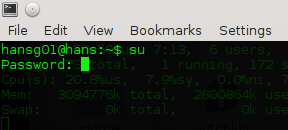
  2. Login as superuser by typing

    su

    This is How We Do It : How to Enable Touchpad Tapping in Linux KDE Touchpad tapping Terminal linux KDE

    You will be editing a system file so you need the administrator permissions.
    Now after you have the administrator permissions be careful while typing commands, because you could edit something with might damage your operating system.

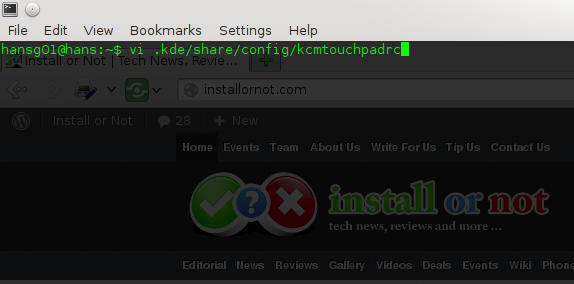
  3. Use your favourite editor (I use emacs, you can use any) to open the file kcmtouchpadrc located at .kde/share/config/ by typing

    emacs -nw .kde/share/config/kcmtouchpadrc

    If you don’t know what is an editor then you can acces the file by typing

    vi .kde/share/config/kcmtouchpadrc

    This is How We Do It : How to Enable Touchpad Tapping in Linux KDE Touchpad tapping Terminal linux KDE
    vi is the editor that is installed by default on every linux based operating system.
    For more info about editors, look on the wiki.

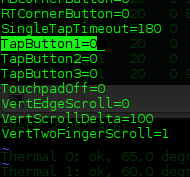
  4. By default all the TapButton variables will be assigned the value 0.
    This is How We Do It : How to Enable Touchpad Tapping in Linux KDE Touchpad tapping Terminal linux KDE
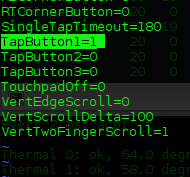
    We have change the value of TapButton1 from 0 to 1.This is How We Do It : How to Enable Touchpad Tapping in Linux KDE Touchpad tapping Terminal linux KDE      This is How We Do It : How to Enable Touchpad Tapping in Linux KDE Touchpad tapping Terminal linux KDE

    If you are using vi then you first need to enable insert mode by typing

    i

    and after you have done the change you need to save the file by typing

    Esc key and then :wq

  5. Reboot your machine and its done.
If you have any problems regarding this do let us know in the comments below.

This is How We Do It : How to Enable Touchpad Tapping in Linux KDE Touchpad tapping Terminal linux KDE

About Hans Gogia


Hans is a linux geek and an open source enthusiast, trying to shift to FOSS. He is a CS undergraduate, a programmer who recently got into android.

Related Posts:

Posted under: Editorial, This is how we do it

Tagged as: , , ,

About Hans Gogia

Hans is a linux geek and an open source enthusiast, trying to shift to FOSS. He is a CS undergraduate, a programmer who recently got into android.

Leave a Reply

Your email address will not be published. Required fields are marked *

You may use these HTML tags and attributes: <a href="" title=""> <abbr title=""> <acronym title=""> <b> <blockquote cite=""> <cite> <code> <del datetime=""> <em> <i> <q cite=""> <strike> <strong>